Showing posts with label Nokia E72. Show all posts

Tuesday, 14 February 2012

Nokia E72 Internet Settings For Jazz

This post contains information about how to configure access points of  Nokia E72 to browse the web. The setting in this post is only for Mobilink Jazz. I will write more networks settings for Nokia E72 after some days.

1. Go to Menu > Control Panel > Settings & Connections > Destination.
2. Then select Options > Manage > New destination and use these settings:

For Mobilink Jazz:
Follow the steps given above and then use these settings:

Connection Name: Mobilink Jaz
Data bearer: Gprs
Access Point Name: jazzconnect.mobilinkworld.com
User name: N/A
Password: N/A
Authentication: Normal
Use access point: Automatically

Monday, 13 February 2012

Nokia E72 Internet Settings For Warid

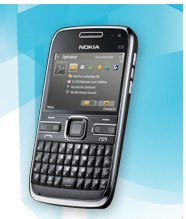
Nokia E72
This is a guide on how to configure access point of Nokia E72 in order to browse the web. I am giving the internet settings of 4 networks at present including Warid, Zong, Telenor, Jazz and Ufone. I will write more networks settings for Nokia E72 after some days.
Nokia E72 is a amazing phone with Wlan, edge and bluetooth. This mobile als contains a built in GPS device.
1. Go to Menu > Control Panel > Settings & Connections > Destination.
2. Then select Options > Manage > New destination and use these settings:

For Warid:
Follow the steps given above and then use these settings:

Connection Name: Warid beta
Data bearer: Gprs
Access Point Name: wap.warid
User name: N/A
Password: N/A
Authentication: Normal
Use access point: Automatically

Then select Options> Advanced Settings and write this:

Network: Automatic
IP Adress: Automatic
Proxy Server Address: 010.004.002.001
Port Number: 8080
Primary/ Secondary Name Server: 0.0.0.0