Monday, 20 February 2012

HTTC MMS Settings

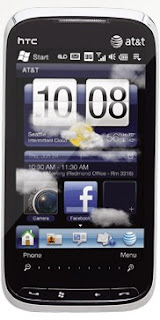
HTC is an amazing brand with amazing phones. They are reliable and have a good reputation in the market. You can configure the mms settings of your htc device:


1.goto Messages Tab
2. Select All Messages>Menu>MMS Options>Servers Tab and  select New. 


At & T MMS Settings For HTC:
Server Name: AT&T MMS 2012
Gateway: wireless.cingular.com
Port Number: 80
Server address: http://mmsc.cingular.com
Connect via MEdia Net
Send Limit: 600K

Mobile Internet and Our World

Our world keeps changing and latest technologies keeps coming. I can still remember the days when gprs was a new technology and people usually brags that they have a gprs enabled mobile. The world changes and the edge comes but the same thing also occurs with edge.Now the 4G technology has also arrived and the 3G is also going to become a part of history. In Pakistan there is still no 3G technology and government is not taking it seriously. Recently an auction for 3G lisences has occured but the arrival of 3G is still far away. 

I always think that the mobile internet has changed our life and is still changing but we donot think about it. You may ask that in what way it is changing our life. 
 
  1. Mobile Banking is saving our time.
  2. Now we can shop online using our mobiles.
  3. We can read our mails online.
  4. We can use video calling feature.
  5. We can download content online more conveniently.
  6. We can manage our business using the mobile internet.
  7. Android mobiles has also changed the concept of mobile internet.
There is a very long list of benefits we are getting from mobile internet.
Mobile Internet is still not so much popular in Pakistan yet but it is becoming popular. The mobile market of Pakistan is very huge and very profitable. Mobile market of Pakistan is among the top 10 mobile markets of the world. So any investment is Pakistan Mobile Industry will be highly beneficial.

Sunday, 19 February 2012

How To Get Airtel GPRS Settings?

A question asked by a lot of people that "How To Get Airtel GPRS Settings?"


And the answer is quite simple. Just SMS MO to 543210 and you will get the settings in the next 2 minutes.

OR if you want to browse with more fast speed  then you have to activate 3G on your sim. Activating 3G is very simple. 

 SMS 3G to 121.

You will not get the 3G settings if your phone does not support 3G service. Do you know 

that Airtel provides internet speed upto 7.2mbps which is many times faster then a gprs 
connection. Buy a 3G phone like Nokia C5 if you want to use 3G technology.

Idea Gprs and MMS Settings

Are you looking for Idea Gprs or Internet or Wap Settings that really works? Then you have just landed on the right page. Idea is the leading cellular network in India owned by Aditya Birla Group. Use the settings given below to use GPRS. These settings are only for Idea and will not work for any other network.


Idea gprs settings:
Connection Name: idea gprs 2012
Data Bearer: GPRS
Username: leave blank
Password: leave blank
APN: imis
IP: 10.4.42.45
Port: 8080
Authentication Type: Normal


And here are the mms settings:

Saturday, 18 February 2012

GPRS, Wap, MMS Settings For Mobilink Jazz

Mobilink jazz is the largest mobile network in Pakistan and their services are very reliable. They also offer their users to browse the web for whole day in just 10 Rs but how will you browse the internet on the mobile if you don't have the proper settings.


1. GPRS Settings For Mobilink Jazz:


Connection Name: Jazz 2012
Bearer: GPRS
Home Page: http://manualsettings.blogspot.com/
APN: jazzconnect.mobilinkworld.com
IP Address: Leave Blank
Username: N/A
Password: N/A
Security: Off
Authentication: Normal


2. Wap Settings For Mobilink Jazz:


Connection Name: Jazz Wap Premium
Bearer: GPRS
Home Page: http://manualsettings.blogspot.com/
APN: jazzwap.mobilinkworld.com
IP Address: 172.24.97.29
Username: mobilink
Password: mobilink
Security: Off
Authentication: Normal


3. MMS Settings For Mobilink Jazz:


Connection Name: Jazz MMS
Bearer: GPRS
Home Page: http://mms/
APN: mms.mobilinkworld.com
IP Address: 172.25.20.12
Username: mobilink
Password: mobilink
Security: Off
Authentication: Normal


Wednesday, 15 February 2012

Nokia X2 02 Price In Pakistan

Nokia X2 02 is an amazing phone with dual sim feature. The Nokia X2 02 comes with a 32 mb ram and micro SD support upto 32 gb. The camera result is also quite impressive. The phone has 2 MP camera, bluetooth, FM radio, TFT screen and a lot of games. Talk time is Up to 9 h 50 min. The best thing of this phone is its powerful speaker. You can easliy swap sims in Nokia X2 02. Adobe flash player is also installed in Nokia X2 02, So you can also enjoy youtube videos and stream any video you like on the internet.
Specifications
Nokia X2 02 Price In Pakistan: Price is 6100 or $ 68

Tuesday, 14 February 2012

Nokia E72 Internet Settings For Jazz

This post contains information about how to configure access points of  Nokia E72 to browse the web. The setting in this post is only for Mobilink Jazz. I will write more networks settings for Nokia E72 after some days.

1. Go to Menu > Control Panel > Settings & Connections > Destination.
2. Then select Options > Manage > New destination and use these settings:

For Mobilink Jazz:
Follow the steps given above and then use these settings:

Connection Name: Mobilink Jaz
Data bearer: Gprs
Access Point Name: jazzconnect.mobilinkworld.com
User name: N/A
Password: N/A
Authentication: Normal
Use access point: Automatically